A business operating systemwith no opinions about your business.
Vertmix Studio ships the skeleton — people, workspaces, records, tasks, files, meetings, automations, permissions and an assistant that can drive all of it. Installable apps teach it the nouns. A creator agency, a dental practice and a roofing contractor end up with three products that look nothing alike, on one skeleton.
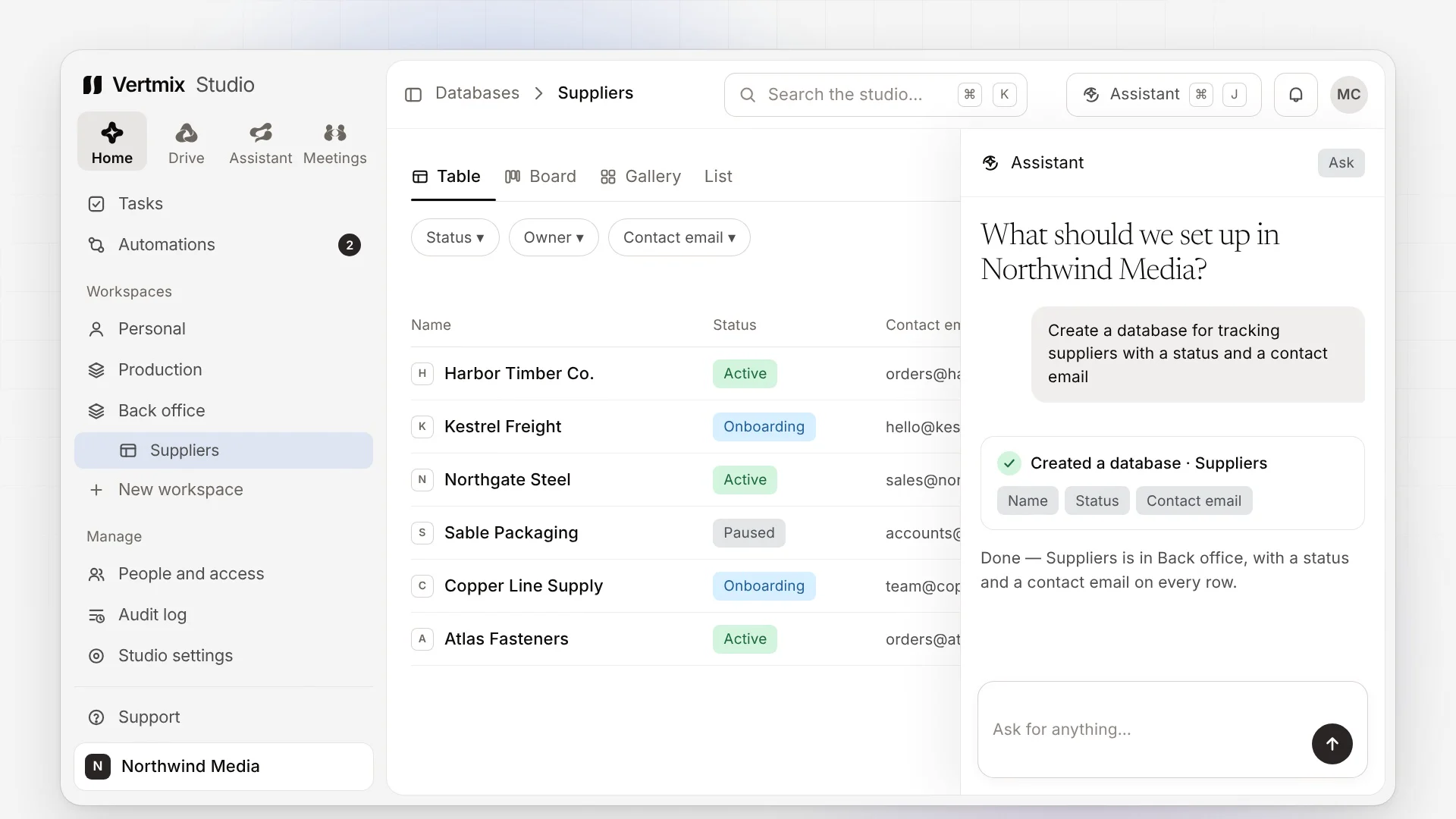
The assistant acts as the person asking — same permissions, same audit trail. Anything destructive shows what it is about to do and waits for a yes.
The skeleton
Every studio startswith the same skeleton.
None of it knows what your business is. All of it is there on day one, and every app you install builds on it rather than bringing a second copy of it.
People and access
Roles a studio defines for itself — Owner, Member, Viewer and Customer come built in — teams and invitations. Each role reaches each app at a level: no access, view, use or manage. The API checks it on every request.
Workspaces and databases
Containers that hold pages and databases. A database is a table, a board, a gallery, a list or a dashboard over the same rows — twenty property types, formulas, relations, required columns, views assigned to the people who need them.
Home
Everyone arranges their own Home from widgets — tasks, progress, any database as a chart — keeps several, or picks one of the studio’s templates. The assistant can arrange it for you.
Tasks
Any database becomes a task source. Mine, unassigned, all; overdue, today, the next seven days — one list across every source you are allowed to see.
Drive
Studio, team and personal files, every database’s attachments and every meeting’s recordings, in one place. Upload links for people without an account, files up to 200 GB, Download all as a zip.
Meetings
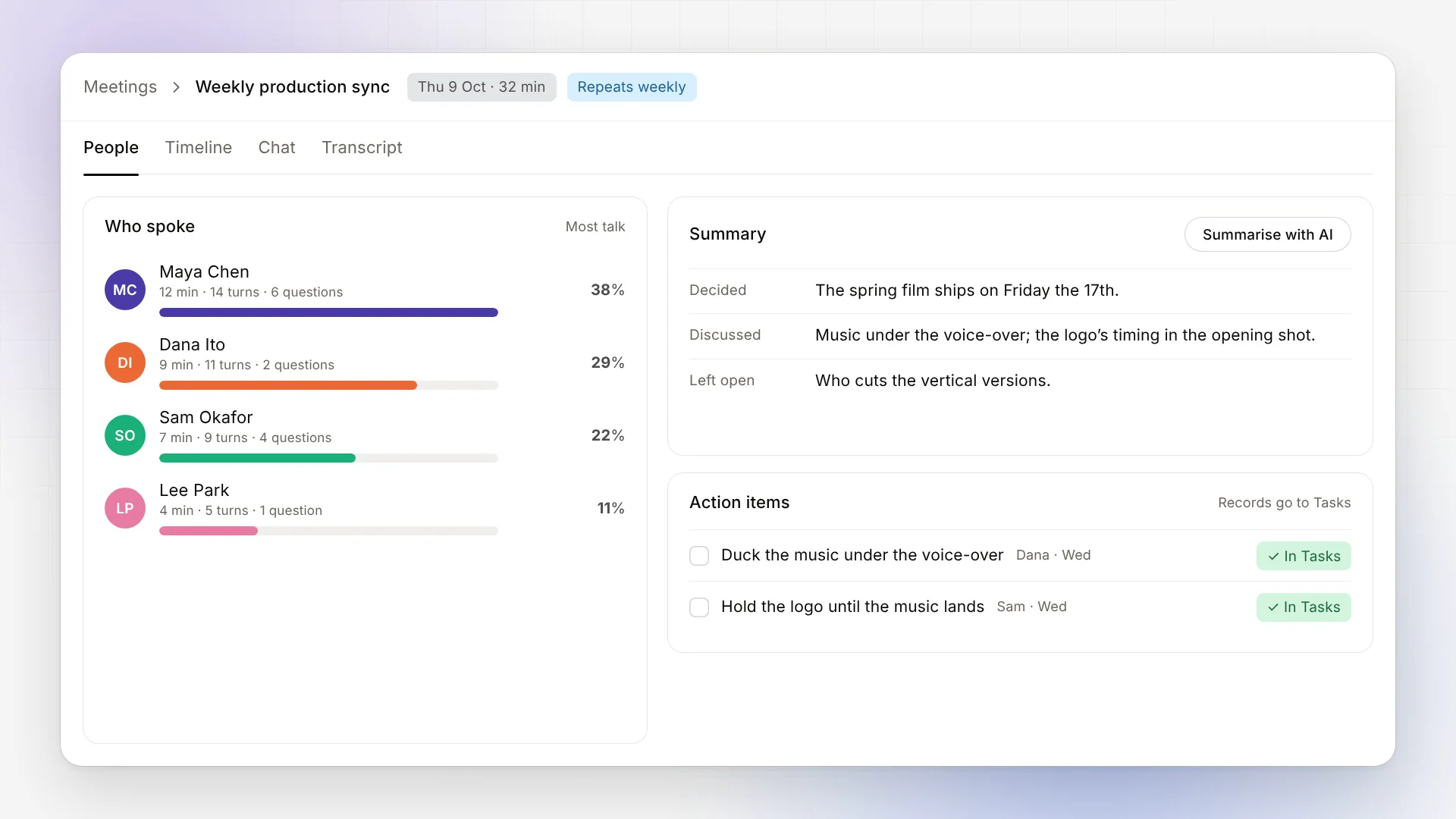
Calls on a video server the deployment owns, with guest links. Transcripts name each speaker, Who spoke counts the talk, and Summarise with AI writes up what was decided.
Automations and agents
When this happens · if these are true · do these. Describe one in words or start from a template, try it with a dry run, see every run. An agent is an escalation, bounded by the same actions.
The assistant
Anything a person can do here, it can do — through the same action library, as the person asking. Small changes run and are shown; deletes and bulk writes wait for a yes.
Claude and other agents
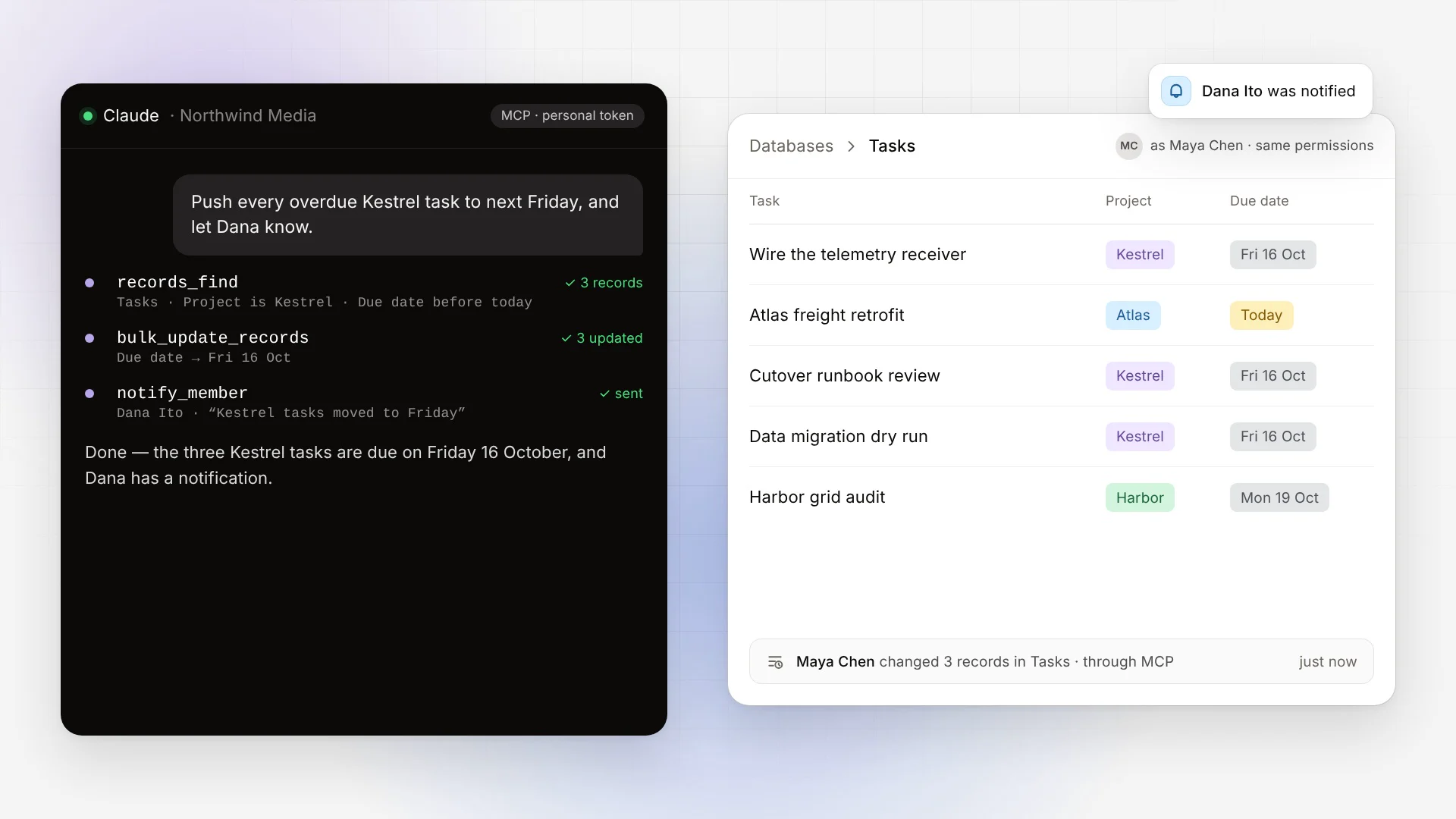
A personal token lets Claude, or any MCP client, work in one studio as you — the assistant’s own actions, narrowed to the permissions you tick and never past your role.
The timeline
One append-only stream per record that apps and automations write to and nobody owns. Frame, Clips and Creators tell one video’s story without an integration between them.
Support
Anyone in a studio can write to support from any screen and follow the thread by email — even from a studio that billing has locked.
Audit log and recycle bin
Everything anyone did — or any agent did as them — by name, readable by the roles you allow. Deleted things wait in the bin, and a removed app leaves every record behind.
If a feature cannot be described without naming an industry, it does not belong in here. That test is the whole product: the core has no industry nouns, and structurally cannot grow one.
Interactive
Not a screenshot.Try the thing.
This is the studio's own layout, running its real flows on scripted data, at whatever size you work at. Pick something you would genuinely need to do and click through it.
A replica with scripted data — nothing here connects to a real studio, and nothing you click leaves this page.
1 overdue task
Tasks
1task overdue, 3 open
- Overdue1
- Today1
- Next 7 days1
Progress
20%1 of 5 tasks done
- Done1
- In progress2
- To do2
Databases
11records across 2 databases
- Content6
- Clients5
Up next
- 3 lights, no budgetContent · Overdue · MonOverdue
- Ep 117 — Q&AContent · Needs reviewToday
- Ep 118 — pacingContent · In progressFri
Workload
3people with open tasks
- Dana2
- Sam1
- Unassigned1
Activity
- 09:12Ep 117 — Q&A, v3 is waiting on DanaFrame
- 10:056 clips ready for Ep 116Clips
- 10:31Ep 116 — the pivot went out to YouTubeCreators
A replica with scripted data — nothing here connects to a real studio, and nothing you click leaves this page.
What’s new
Talk to it. Hand it to an agent.Let the meeting write itself up.
Three things the studio learned this autumn — each built on the same skeleton rather than bolted beside it.
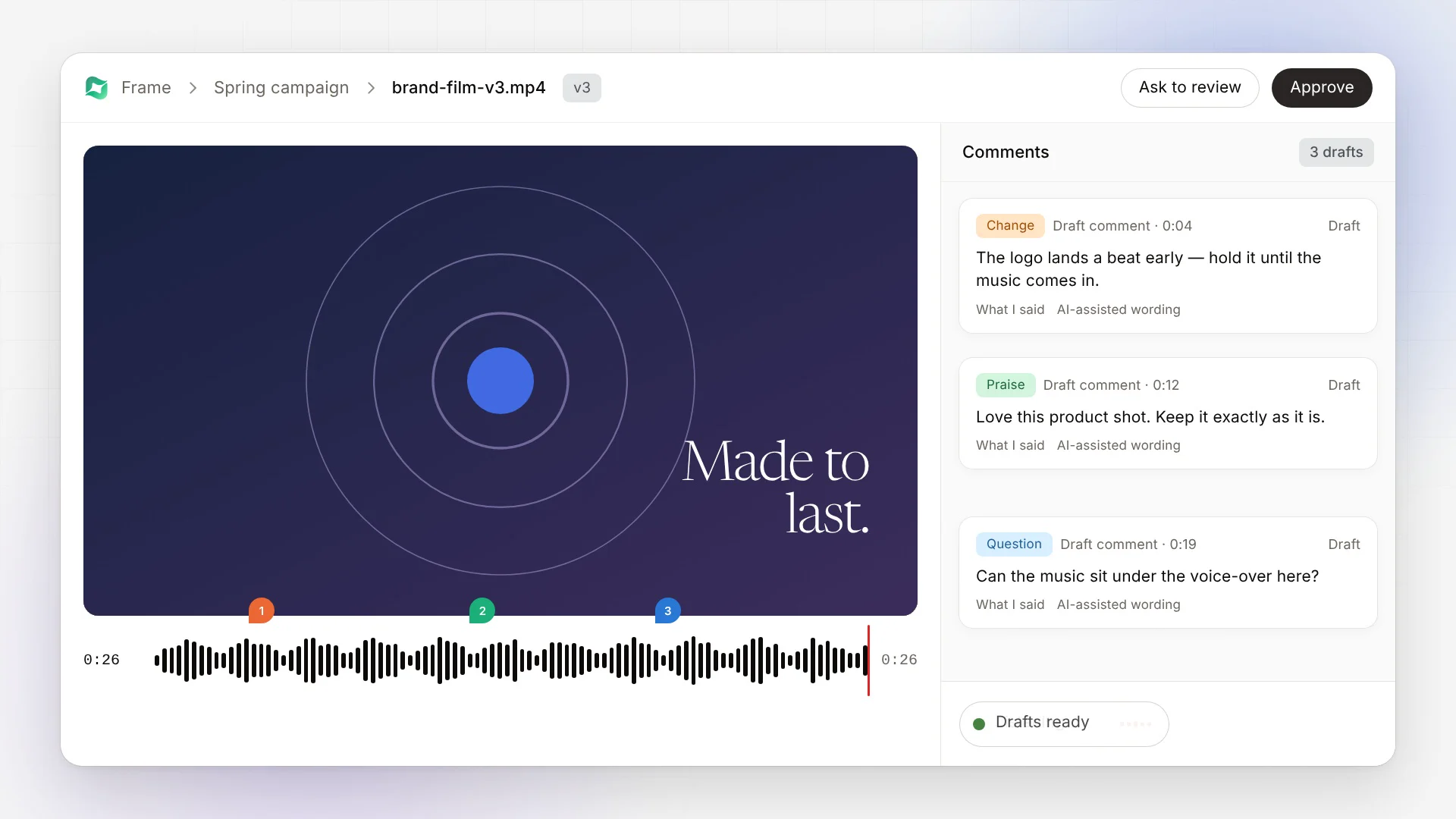
Frame · AI review
Talk while you watch.
Press Record review and say what you think as the cut plays. Frame transcribes you, places each remark at the moment you meant, and writes it up as a draft — a change, praise or a question — for you to edit and publish under your own name.
- Record review
- Draft comment
- What I said
- Publish all
MCP · personal tokens
Hand it to Claude.
A personal token lets Claude, or any MCP client, work in one studio as you — find records, change them in bulk, tell a teammate. It uses the assistant’s own actions, only ever within the permissions you tick, and every change lands on the audit log as yours.
- records_find
- bulk_update_records
- notify_member
- through MCP
Meetings
Meetings that write themselves up.
Transcripts name each speaker, and Who spoke shows each person’s talk time, turns and questions. Summarise with AI writes up what was decided, discussed and left open, and each action item becomes a record in the database you choose.
- Who spoke
- Summarise with AI
- Make it a record
- Repeats weekly
Also new
- Forms, with a database behind every form
- Several Homes each, and studio templates
- Support from every screen
- Download all, upload links, 200 GB files
- Single sign-on per studio
- Installs as an app on a phone
- Every app reached at a level per role
- Copy, paste and fill many cells at once
Apps
Install what the teamactually works in.
The studio brings people, records, files and permissions. Apps bring the craft. Each one is a bundle and a declaration — the objects it adds, the scopes it needs, the pages, widgets, actions and events it contributes — and publishing one never redeploys the platform.
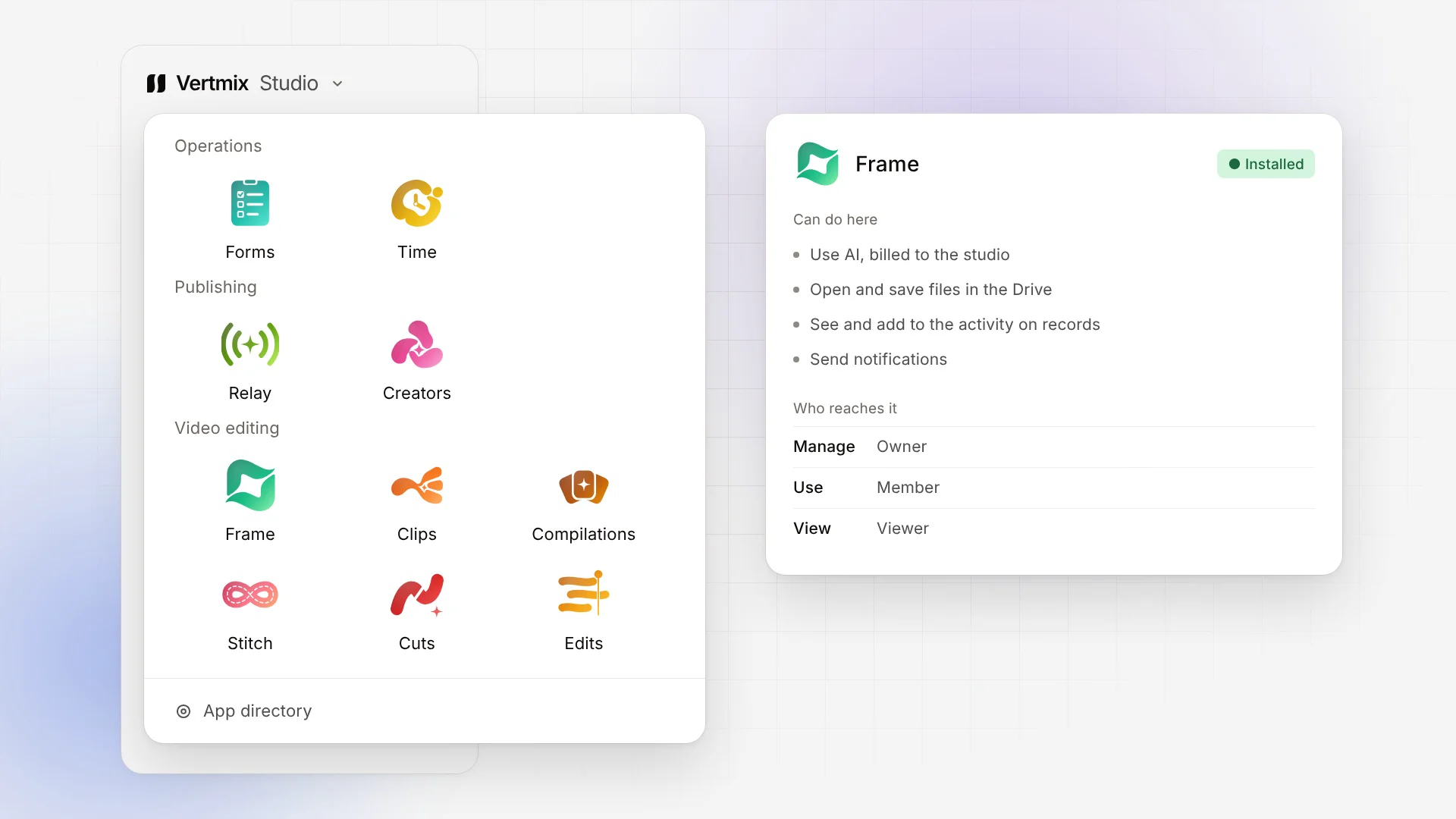
Operations

Forms
Forms and answers
Build a form from a template or a sentence, with logic, audiences from anonymous to members, QR codes and embeds. Every form owns its database, so each answer is a record.
- All forms

Time
Time tracking
A timer or a manual entry against any record. Today, my time, the studio’s time — and a permission decides who may see everybody’s rather than only their own.
- Today
- My time
- Studio time
Publishing

Creators
Publish and measure
A library, a calendar and a publish queue for the networks the studio is connected to, with each network’s own numbers read back into one place.
- Library
- Calendar
- Sent
- Analytics

Relay
Go live everywhere
For studios that run a streaming relay: go live to YouTube, Shorts, Twitch, Kick and Facebook at once, with layouts and settings that cannot break a stream.
- Live
- Destinations
- Layouts
- Settings
Video editing

Frame
Review and approval
Review over Drive folders: versions stacked, frame-accurate comments, Approve or Ask to review — and talk while you watch to get draft comments where you meant them.
- Projects
- AI reviewer

Clips
AI clipping
Pick a video already in the Drive, say what you are looking for, and finished clips land back in the Drive — captions burnt in, or beside them as .srt and .vtt.
- New clips
- History

Cuts
Rough cuts
Many recordings of one event become one editable rough cut — exported for Premiere, Resolve or Avid, or handed on to Edits and Frame.
- Cuts
- Music

Compilations
Search a channel
Connect a YouTube channel once, search it in plain words, keep the moments you want, and plan and render a compilation from them.
- Overview
- Channels

Stitch
Long uploads
Join whole videos from a channel into one long upload, trimming the intros and outros they repeat.
- Stitches
- Channels

Edits
The editor
A timeline editor the studio runs for you. Media comes from the Drive, and what you export lands back in the project’s own folder.
- Projects
- Shared with me
- Recent
Every app declares its scopes up front, and each role reaches each app at a level — no access, view, use or manage. Taking an app out leaves every record it made where it is: the data belongs to the studio, not to the app.
Connections
Connected once.Brokered to every app.
A connection is owned by the studio, never by an app. The connectors door does the OAuth and keeps the token encrypted at rest; an app's function is handed a scoped credential and never sees the raw secret.
Drag them around. They are stickers, not a table.
Ten networks the studio has a name and a mark for today, and the OAuth client its connectors run on. A tile for one the deployment has not configured says so rather than hiding.
Verticals
One skeleton.Four businesses.
The same five primitives — Person, Company, a custom Object, a Pipeline, an Automation — and a Connection or two. Four products that look nothing alike, and not one change to the core between them.
Frame reviews the cut, Clips cuts it down, Creators sends it out — and every one of them writes to the same video's timeline.
Creator agency
Idea → Script → Shoot → Edit → Published
- Person
- Collaborator
- Company
- Brand / sponsor
- Object
- Video
- Pipeline
- Idea → Script → Shoot → Edit → Published
- Automation
- On publish → notify the sponsor
- Connection
- YouTube, TikTok
The apps named in these timelines are what a pack for that business ships. What ships in the product today is on this page; the rest is the shape a pack takes.
Pricing
Plans and pricing.
One plan, and it is the whole product — every part of the skeleton and every app the platform publishes. What you pay for is people, storage and the AI you actually use.
Studio
The whole product$30/seat/month
Seats in blocks of ten · storage from $10 per TB · AI at 1.5× the provider’s cost
Create your studio- Every part of the skeleton: people, workspaces, databases, Home, tasks, Drive, meetings, automations, the assistant, MCP and Support
- Every published app — Forms, Time, Creators, Relay, Frame, Clips, Cuts, Compilations, Stitch, Edits — free unless the price book attaches an add-on
- Seats in blocks of ten: a confirmed member takes one, a pending invitation reserves one, the Owner counts — Customers and platform staff do not
- Storage in whole terabytes from 2 TB, measured daily against what you hold
- AI answers and transcription each billed at 1.5× what the provider charges, captured monthly
- Cancel at the end of the period; the studio stays readable until then
Enterprise
Custom
A studio the platform runs for you, outside the metering.
Contact us- Exempt from seat, storage and AI metering
- Meetings on a video server the deployment owns
- Private apps published to your instance
- Single sign-on through your own identity provider
- Dedicated onboarding and support
What is metered
- $30
- per confirmed seat, per month — sold in blocks of ten
- $10
- per terabyte of storage, per month — two terabytes minimum
- 1.5×
- the provider’s charge, for every AI answer and every minute transcribed
- $0
- for an app, unless the price book attaches an add-on to it
Frequently asked questions
Who counts as a seat?
A confirmed membership. A pending invitation reserves a seat until it is accepted or cancelled, and the Owner counts; Customers and platform staff do not. Seats are bought in blocks of ten, and inviting past them is refused with a pointer to Billing, where an Owner adds a block on the spot.
How is storage counted?
In whole terabytes, from two. The bytes a studio holds are measured whenever Billing is opened and once a day by the reconcile tick, and an upload that would cross the purchased amount is refused with the same pointer. The price is a flat per-terabyte figure in the price book.
How are AI and transcription billed?
Every answer the assistant or an automation’s AI step produces, and every recording transcribed, writes one usage row with the provider’s real cost. The reconcile tick sums what has not been billed, applies the multiplier in force — 1.5× by default — and captures it from the studio’s subscription in cents, carrying any fraction forward. Nothing is estimated.
Can Claude or another agent work in our studio?
Yes, where a Platform admin has turned MCP on and your role allows it. A personal token, made on your Account page, lets an MCP client work in that one studio as you — narrowed to the permissions you tick, never past your role — and everything it does is on the audit log as yours.
What happens if we stop paying?
The studio locks: the sidebar keeps Studio settings, for its Billing tab, and Support, and every other screen shows the lock. Nobody is trapped — leaving the studio and deleting it still work — and nothing is deleted. Subscribing again unlocks it as soon as the payment is approved.
Can we change seats, or cancel?
Yes. A change of plan is approved on PayPal’s page and takes effect from the next cycle; nothing is prorated up or down. Cancelling keeps the studio open to the end of the period you paid for.